


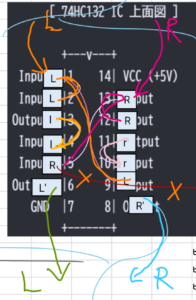
DIY SOCD Cleaner for Leverless Controllers: Designing a Circuit with Just Two 74HC132 Logic ICs
Please note that this is still purely theoretical and has not yet been physically tested.This article is a work in progress and subject to updates.The design assumes padhacking an existing Nintendo Switch controller. While that is the technical focus, the real highlight was the hilarious debate—almost an all-out argument—I had with Gemini. More on that […]

Minimalist SOCD Cleaner Circuit for Leverless Controllers: Built with Just Two 74HC132 Logic ICs!
Intro: I've Been Arguing with Gemini Lately Lately, I've been getting into endless technical debates (and heated back-and-forths) with Google Gemini.When I asked Gemini to design an SOCD (Simultaneous Opposite Cardinal Direction) cleaner circuit for a custom leverless fightstick, the AI constantly slipped up and exposed its limitations.At first, it confidently suggested, "Just cross-couple two […]
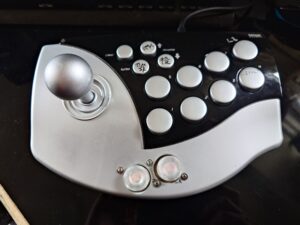
Adding Parry and Impact Buttons to My Controller
I really prefer having the Drive Impact mapped to my thumb, so I decided to add a couple of extra buttons.Here's the finished product! For the buttons, I used just the magnetic plastic parts, combined them with molded stems from keyboard keycaps, and made them using silicone molds and UV resin (skills I picked up […]
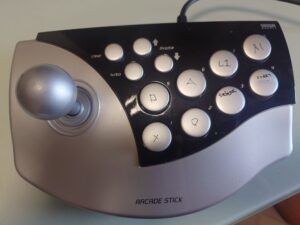
Modding a Sanwa Supply Arcade Stick: Upgrading to 11 Buttons with Custom Simultaneous Press Macros
I picked up this arcade stick at Hard Off for around 2,200 yen. It had been sitting around unused for a while, but when I tested it with Street Fighter IV (PS3), it still worked wonderfully, and I instantly got hooked all over again.Carried away by the momentum, I bought Street Fighter 6 on Steam, […]
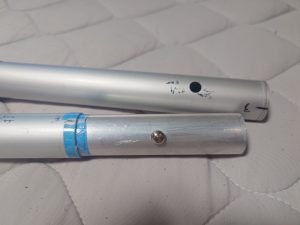
DIY 1-Piece Kayak Paddle Conversion: Step-by-Step 2-Piece Modification for Easier Car Transport
When starting out with kayaking, many people debate whether to get a 2-piece paddle for easy transport or a 1-piece paddle for reliable rigidity. I initially chose a solid 1-piece paddle and carried it on the roof of my Mazda Roadster alongside the kayak. However, loading it every time was a hassle, and the paddle […]
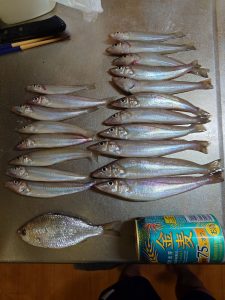
Kayak Fishing for Whiting in Karatsu
Honestly, you don't really need to launch a kayak just for whiting, but I'm determined to make the most of kayak fishing this year—so think of this as an opening jab! The spot was the beach area right beside Karatsu Higashi Fishing Port. I set off at a leisurely pace and kicked things off with […]
Predicting the Future of Consumer PCs: The Demise of the GPU and the Rise of the Superchip
1. [Current State] The AI Boom and the Reality of the "Memory Wall" The Limits of Everyday AI: As AI becomes embedded in our daily tasks, relying on cloud processing for everything will become unsustainable due to latency issues and skyrocketing server costs. The Inevitable Shift to Local Processing: We need to handle data and […]
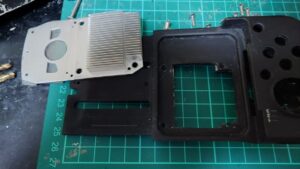
DIY Heatsink Mod on a Game Controller to Beat the Heat
When playing Monster Hunter 3G on the Azahar 3DS emulator, the Snapdragon 8 Gen 1—notorious for running hot—gets blazing hot, causing frame drops and even crashing the app during quick saves and loads. To keep temps down, I decided to mount a heatsink onto my controller. I picked up an NVIDIA Quadro 400 heatsink at […]
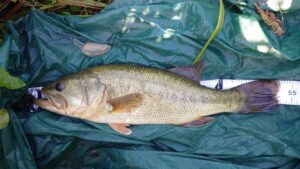
Kawachi Dam: Landing a 53cm Bass on My Homemade Crankbait Prototype
With the weather cooling down, I decided to check out Kawachi Flood Control Dam. I took it easy—woke up just after 6:00 AM, started fishing right before 7:00, and landed one around 7:30. Believe it or not, despite going there many times, this was my very first time actually catching a fish at Kawachi Dam! […]
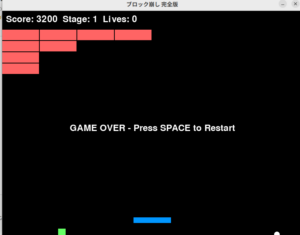
Writing Game Code with AI: Part 2
This is based on the original article. The code from the very end of that article is posted here. You can save this code into a text file as a ".py" file, install Python, and run it from your terminal using the command: python filename.py